


CARFAX Car Care App
4.87.58K Reviews
App Specs
- Version
- 5.1.0
- Updated On
- License
- Free
- Downloads
- 1,000,000+
- Developer
- CARFAX, Inc
- Categories
- Auto & Vehicles
- Platform
- Android, iOS
Screenshots
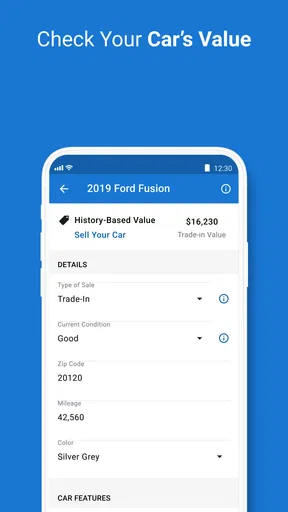
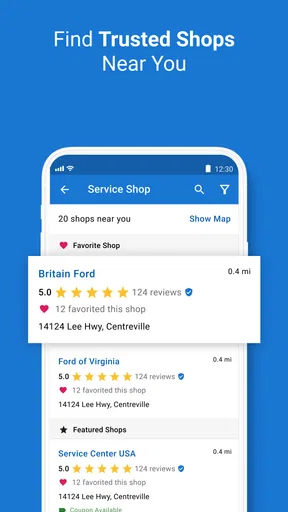
 Analysis by AppCompare
For me, the deciding question with a car-care app is not whether it can replace a mechanic; it cannot. It is whether it makes the ordinary work of owning a car easier: remembering service dates, keeping useful records together, and knowing what to ask about when a warning or recall comes up. CARFAX Car Care is aimed at those practical jobs, and it makes the most sense for drivers who want a straightforward place to keep track rather than another tool to study.
Start with what you need to remember
Before adding an app, I’d think about how you currently manage maintenance. If you rely on a paper folder, a calendar reminder, and a vague memory of the last oil change, bringing those details into one place can make routine ownership less scattered. If you already keep a careful spreadsheet and enjoy updating it, the benefit may be smaller. The useful test is whether you can quickly answer basic questions about your car without searching through old receipts.
CARFAX, Inc. makes this free Auto & Vehicles app for Android and iOS. It is rated for Everyone, has a 4.8 average from around 42,000 ratings, and has been installed over a million times. Those figures suggest that it has found a broad audience, but they do not tell me whether its approach suits every driver. I’d judge it by how well it fits your habits and how much of your vehicle’s history you want to manage yourself.
When a digital record is most useful
The strongest case for using a car-care record is continuity. A car can go to different shops over the years, and the person arranging the next visit may not be the person who handled the last one. Keeping service details in a single timeline gives you a starting point for conversations about what was done and when. It can also be useful if another family member shares the car and needs to understand its recent care.
There is a practical distinction between a record that helps you remember and a record that proves every detail. I would still keep invoices and paperwork for major work, warranty questions, or anything where exact parts and labor matter. Use the app’s history as a convenient overview, then check the original receipt if a mechanic, buyer, or service provider needs precise documentation. That combination is more dependable than treating any one log as the complete authority.
Where this product wins
If you've ever found yourself scratching your head over your car's maintenance schedule or wondering when your last oil change was, then the CARFAX Car Care App might just be your new best friend. This app is like having a personal assistant dedicated to keeping your vehicle in tip-top shape.
What is the CARFAX Car Care App?
The CARFAX Car Care App is essentially a digital logbook for your car. It’s available on both Android and iOS, making it accessible to almost everyone. The app allows you to track your car's service history, get reminders for upcoming maintenance, and even monitor any open recalls. It's like having a mechanic in your pocket—without the greasy hands.
Worth Reading Before You Choose

EA SPORTS FC Mobile 26 Is a Bigger Football Game, but It Takes Time

Flipboard Shows What News Apps Must Do Beyond the Feed

Switching to Android Auto Means Rethinking Your Driving Routine

Google Calendar Makes a Crowded Week Easier to Manage

Ludo King Makes the Most of the Minutes Between Plans

Baby Panda World Brings Quick Play to Modern Phones, but Its Game Library Feels Busy
Setting Up Your Car Profile
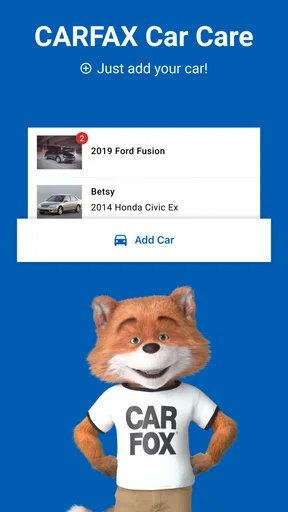
Getting started is a breeze. Just download the app, and you’ll be prompted to add your vehicle using either the VIN or license plate number. Once that’s done, the app pulls up your car’s history, and voila! You have a comprehensive overview right at your fingertips.
What I love about this setup is how user-friendly it is. The interface is clean and intuitive, so even if technology isn’t your strong suit, you’ll find it easy to navigate. Plus, the app supports multiple vehicles, which is perfect if you have more than one car in the family.
Keeping Tabs on Maintenance
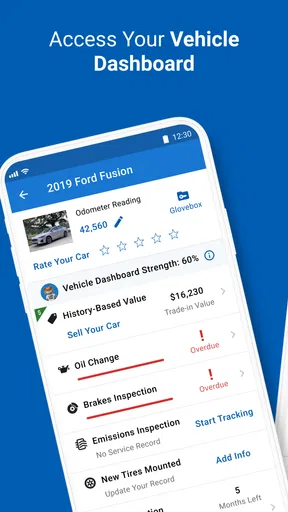
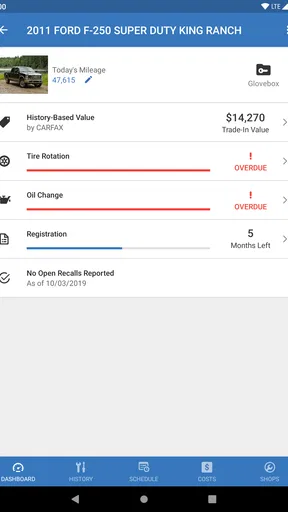
One of my favorite features is the maintenance schedule. The app sends you timely reminders for oil changes, tire rotations, and other routine services. No more sticky notes on the fridge or trying to remember when you last checked your tire pressure.
These notifications are lifesavers, especially for those of us who tend to forget the little things. And let’s be real, keeping your car maintained not only prolongs its life but also saves you money in the long run by preventing major repairs.
Using reminders without following them blindly
A reminder is a prompt to check what your vehicle needs, not a diagnosis or an instruction to book work immediately. Cars differ in age, mileage, driving conditions, and prior repairs, so I’d compare an alert with the owner’s manual and the advice of a trusted mechanic before approving a service. This is especially useful if a shop recommends several items at once: the app can help you recall the timeline, while the mechanic can explain which work is due and why.
One small habit makes the reminders more valuable: after a service visit, take a moment to make sure the work is reflected in your records. If details are incomplete or a visit is not represented as expected, keep the receipt and use it as your reference. A reminder system is only as helpful as the information you can rely on, and a quick check prevents a later conversation from depending on memory alone.
Recalls and Alerts
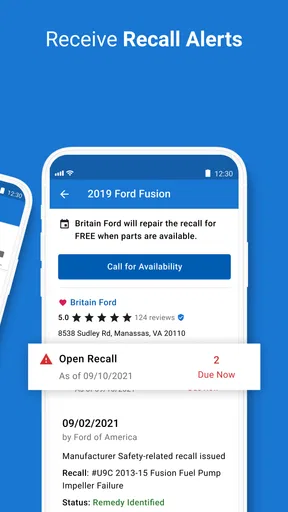
The app also keeps you updated on any open recalls, which is crucial for safety. You’ll get real-time alerts if there’s a recall on your vehicle, which means you can address issues before they become serious problems. This feature adds a layer of security that’s hard to put a price on.
How to act on a recall notice
I’d treat a recall alert as a reason to verify the next step, not as a repair appointment by itself. Check that the notice applies to the vehicle you own, then contact an appropriate service provider to ask what action is needed. If you bought the car used or have changed vehicles since setting up a profile, confirm that the correct car is selected before making decisions. That extra pause is worthwhile because vehicle records and the car in your driveway must match.
For drivers who rarely check manufacturer or government recall resources on their own, an alert in the same place as maintenance information is a helpful nudge. It does not remove the need to follow through, though. I would not use a quiet notification history as proof that a car has no safety issue; when buying a used vehicle or investigating a concern, check the relevant official channels as well.
Service History at a Glance
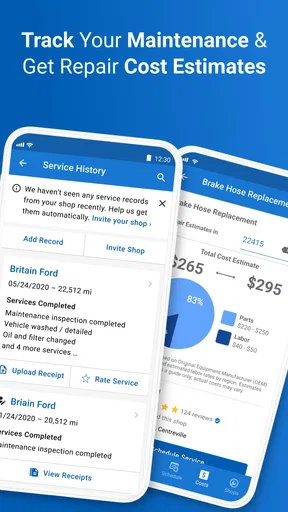
Ever found yourself at the mechanic trying to remember if you had your brakes checked recently? With the CARFAX Car Care App, all your service history is logged and easily accessible. It’s like having a diary for your car—one that doesn’t require any writing on your part.
The app organizes all past services in a neat timeline, making it super simple to check when your last service was or what parts were replaced. This can be a huge help when discussing your vehicle with a mechanic or even if you’re considering selling your car.
A realistic handoff between drivers
Imagine a household where one person usually books the garage, but another takes the car in while that person is away. A shared understanding of recent work can prevent both people from asking for the same service or overlooking a repair that was already completed. Before the visit, I’d look at the history together, note any warning signs the driver has noticed, and keep the invoice after the appointment. The app helps organize the conversation; it does not replace the driver’s description of noises, handling changes, or dashboard lights.
The same record can be useful when you are preparing to sell. It gives you a quick way to revisit the car’s maintenance story and identify paperwork worth gathering. I would present invoices for significant jobs rather than expecting a timeline alone to persuade a buyer. A tidy history is a helpful supporting detail, not a substitute for an inspection or a guarantee about a used car’s condition.
Fuel Tracking and Cost Management
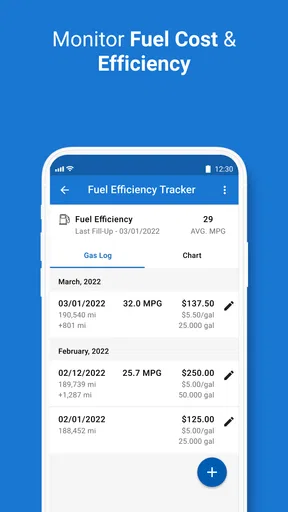
If you're someone who likes to keep an eye on fuel efficiency, the app also allows you to track fuel expenses. While not its main feature, it’s a nice bonus for those who are budget-conscious. You can log fuel purchases and see trends over time, helping you manage your car expenses better.
Fuel logs as a light-touch budgeting tool
I’d use fuel entries to notice broad patterns, not to treat every change as a precise measure of the car’s health. A different commute, weather, traffic, load, or driving style can affect consumption, so one unusually expensive fill-up does not tell the whole story. Logging consistently is more useful than entering a few purchases whenever you remember; otherwise, gaps can make comparisons misleading.
This feature will appeal most to someone who wants a simple view of running costs alongside maintenance. If your main goal is detailed household budgeting across fuel, insurance, parking, and repairs, a dedicated finance or expense tracker may be a better fit. The trade-off is convenience: keeping fuel notes beside vehicle records is easier, but a specialized budget tool may offer a broader picture of spending.
Choosing between an app, a notebook, and a garage system
The usual alternatives are not all competing apps. A paper folder is dependable when you keep receipts but awkward when you need to find a date quickly. A calendar is good at prompting a future task but does not naturally tell the story of past repairs. A spreadsheet gives careful owners control over fields and totals, although it asks them to build and maintain the system. CARFAX Car Care sits between those approaches: it is more organized than scattered notes, but less suited to people who want to design their own detailed database.
A garage’s own records can be more precise for work performed there, while this app is useful as a personal overview across ownership and service conversations. I would not assume that any digital history contains every repair, particularly if work was done privately or records were never captured. If completeness matters, enter or retain the details you have and compare the timeline with your paperwork. That small bit of housekeeping is the cost of getting a dependable personal record.
Who should make the switch—and who should not
I can see this fitting drivers who forget service intervals, households with more than one vehicle, and people who want a quick history to consult before calling a shop. It is also a sensible starting point for a first-time owner who wants to build a maintenance routine without creating a spreadsheet from scratch. The current version is 4.15.0, and the app has been available since September 14, 2012; what matters in daily use is whether its present workflow feels easier than the system you already trust.
On the other hand, skip it if you prefer not to maintain vehicle information digitally, if you need a highly customizable fleet-management setup, or if your mechanic’s records already give you everything you need. It is not a substitute for diagnosing a problem, comparing repair estimates, or deciding whether a safety issue can wait. Drivers who want a comprehensive cost ledger may also prefer a dedicated tracker, while those who simply need one reminder can use a phone calendar with less setup.
Switching does not need to mean abandoning your old records. I’d start with the vehicle you use most, check that its profile is correct, and compare the visible history with recent invoices. Keep the paper trail for important repairs, then decide after a few weeks whether the reminders and timeline actually save you time. If the record feels incomplete, maintaining both sources is better than throwing away useful receipts just to have a single app.
Final Thoughts
In a world where everything is going digital, having an app like the CARFAX Car Care App is a no-brainer for car owners. It takes the hassle out of managing your vehicle's maintenance and offers peace of mind with its recall alerts and service reminders.
Whether you're a car enthusiast or someone who just wants to make sure their ride is running smoothly, this app is a valuable tool. Plus, it’s free, which is always a win in my book. So, if you haven’t already, give it a spin. Your car—and your wallet—will thank you.
My recommendation
I’d recommend it to a driver who wants maintenance reminders and a convenient place to review service history, especially if the current system is a mix of memory, messages, and receipts. The free price makes it easy to try without committing to a paid service, and the Everyone age rating reflects its broad, everyday audience. Just remember that a reminder is not a mechanic’s assessment and a digital timeline is not a replacement for invoices or an inspection.
My practical approach would be to add the car, verify the details, use alerts as prompts to check what is due, and keep receipts for work that matters. If the app makes those small tasks easier, it is earning its place on your phone. If you need custom fleet reporting, exact financial accounting, or a complete repair archive without any manual checking, another method will serve you better. For ordinary ownership, though, it offers a useful balance of convenience and record-keeping without asking you to become your own service manager.
Pros
- User-friendly interface for easy navigation.
- Comprehensive vehicle history reports.
- Real-time maintenance alerts.
- VIN scanning for quick access.
- Wide range of supported vehicles.
Cons
- Limited features in the free version.
- Requires internet for updates.
- Occasional syncing issues reported.
- Some reports have outdated info.
- Notifications can be overwhelming.
FAQs for CARFAX Car Care App
What features does the CARFAX Car Care app offer?
The CARFAX Car Care app provides a comprehensive vehicle management system. Users can track service history, receive maintenance reminders, and monitor recalls. The app also allows you to manage multiple vehicles in one place, making it easier to stay organized and ensure your car is well-maintained.
Is the CARFAX Car Care app free to use?
Yes, the CARFAX Car Care app is free to use. It offers its core features without any cost, allowing users to manage their vehicle maintenance and history effectively. However, certain features may require additional purchases or subscriptions, so reviewing the app details is advisable.
How does the CARFAX Car Care app track my vehicle's service history?
The CARFAX Car Care app connects to the extensive CARFAX database, which compiles service records from mechanics, dealerships, and repair shops nationwide. This allows the app to automatically update your vehicle's maintenance history, providing a detailed and accurate service log.
Can I set up maintenance reminders in the CARFAX Car Care app?
Absolutely! The app allows users to set up custom maintenance reminders based on mileage or time intervals. This feature ensures you never miss essential services like oil changes or tire rotations, helping to prolong the life of your vehicle and maintain its performance.
Does the CARFAX Car Care app support multiple vehicles?
Yes, the app supports multiple vehicles, making it ideal for families or individuals with more than one car. You can easily add and manage each vehicle's data, track their maintenance schedules, and receive reminders, all within a single, user-friendly interface.


